Zoom · Experimentation · Conversion Optimization · 2022 – 2024
Optimizing conversion on Zoom.com
At Zoom, I led design for a cross-functional experimentation team (design, engineering, analytics, and ecommerce) running 4–5 experiments per week across Zoom.com. These are three of them: different problems, different hypotheses, different kinds of friction.
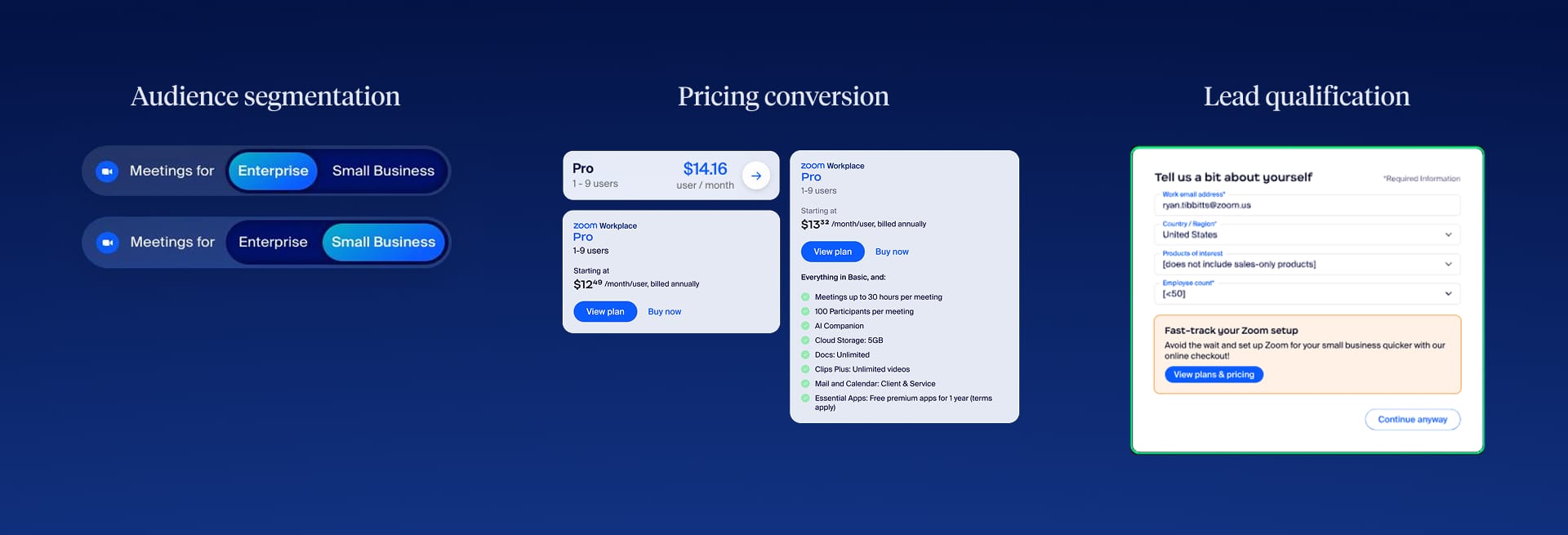
Overview
The experimentation program
Zoom's explosive growth during 2020–2022 brought something unexpected: a massive new consumer and small business audience. Zoom had been built for enterprise, but suddenly millions of individuals and small teams were signing up, and the website wasn't designed for them. The experimentation program was founded with a specific directive: optimize eCommerce for this new B2C and SMB audience.
The team was cross-functional by design: a designer (me), an engineer, an analytics partner, and an ecommerce lead. We ran structured A/B and multivariate tests on a cadence that kept the program moving. Most tests were targeted and tactical. A few produced findings we didn't expect. The three below are the ones worth telling.
Experiment 01
A page built for everyone, optimized for no one
Context
Zoom's post-2020 audience was unusually diverse: freelancers, small businesses, and Fortune 500 enterprises all landing on the same product pages. The pages had been built for enterprise buyers, but that was no longer who most visitors were.
Zoom had responded by building SMB-specific variants of the product pages, with different messaging, different pricing emphasis, different tone. The problem was that nobody was finding them. Internal data told a clear story: roughly 25–40% of Meetings page visitors were small businesses, but only about 5% of that traffic was reaching the SMB page.
Hypothesis
The channels driving visitors to the Meetings page (SEO, paid, product awareness) were deeply optimized for the enterprise version. Carving off a meaningful share for the SMB page through those channels alone would have been slow and expensive. The audience was already there. They just weren't being served the right experience.
I saw a simpler path. Rather than fighting for traffic at the channel level, put the choice directly on the page: a toggle letting users self-select between Enterprise and SMB at the moment they arrived. I pitched it, designed it, and ran the test.
What we built
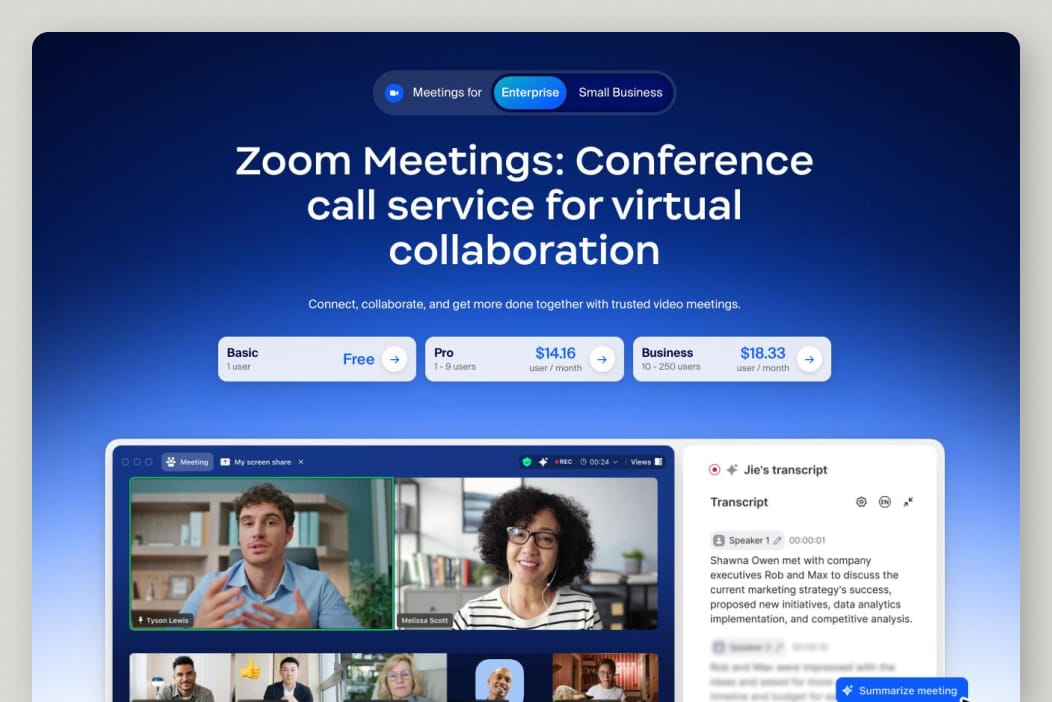
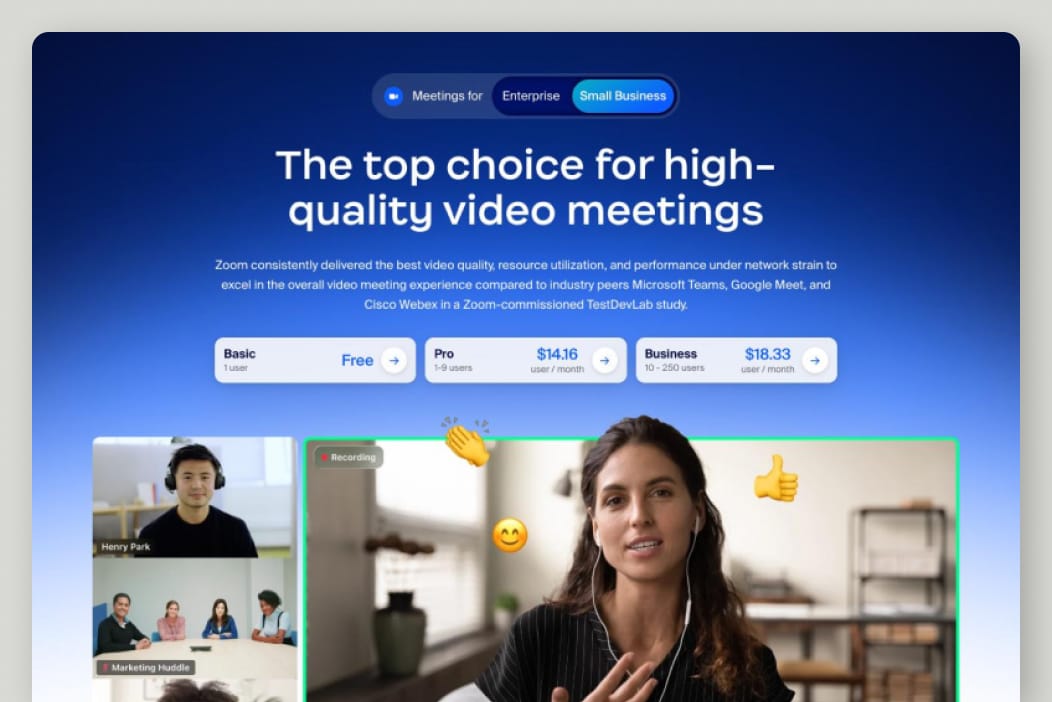
The intervention was deliberately minimal. A two-state toggle at the very top of the Meetings product page, switching the full page content between Enterprise and SMB variants. No new pages, no new navigation. Just a clear, prominent moment of self-selection.
Outcome
The traffic shift was immediate. SMB page visits increased 1,200%. We hadn't driven more traffic to the site; we'd finally given the existing traffic somewhere to go. Conversion improved on the SMB page. What we didn't expect was that engagement improved on the Enterprise page too. Once users could choose, both audiences were more confident they were in the right place.
Experiment 02
From A/B tests to a configurable pricing system
Context
Product pages on Zoom.com didn't show pricing. Each one had a CTA that sent users to the pricing page, a separate destination, where they could compare plans and make decisions. It seemed clean. It wasn't working.
Behavioral analytics showed a friction pattern we hadn't fully appreciated: users were navigating back and forth between product and pricing pages repeatedly before converting. They'd read about Zoom Phone, go check pricing, come back to read more, check pricing again. The page separation had created a loop rather than the clarity we'd assumed.
Hypothesis
Our hypothesis was that surfacing pricing directly on product pages would break the loop. If users could see the relevant plan options in context, without leaving, we'd reduce friction and improve the rate at which product page visitors continued to pricing intent.
The test series
This wasn't a single test. It was a structured series of three sub-tests, each with 3 variants and 1–2 rounds of iteration: over 20 variants in total. Each sub-test isolated a different variable.
-
Series 01
Placement
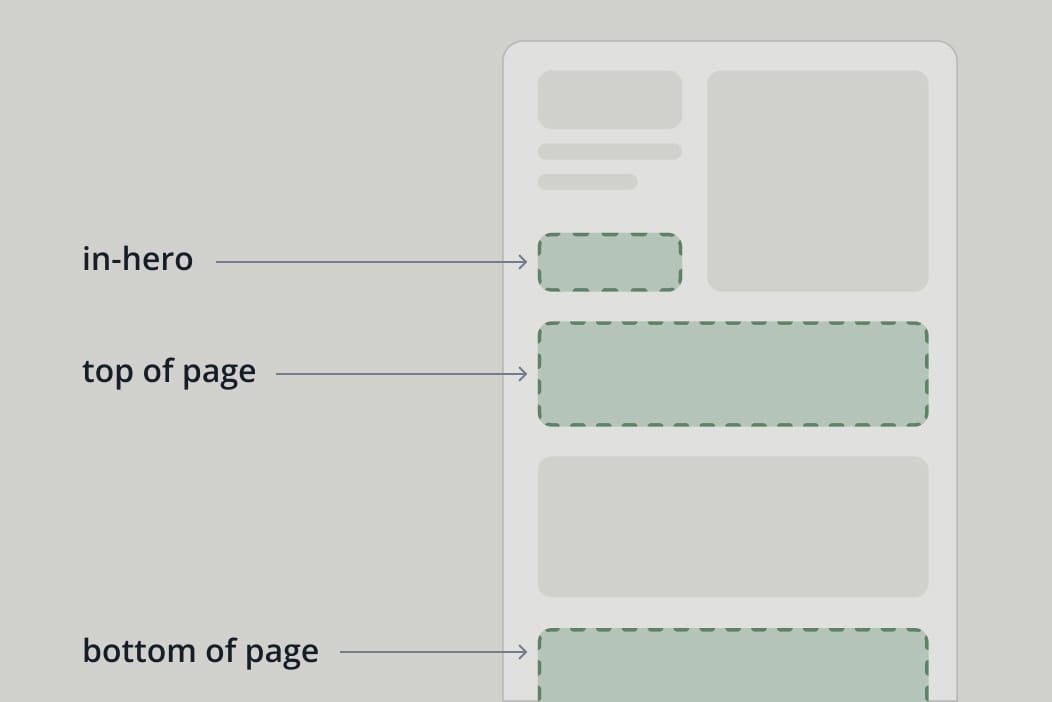
Where on the page do pricing cards perform best? We tested card placement at the top of the page, mid-page after feature content, and anchored near the primary CTA. Position relative to where users had already formed intent mattered more than we expected.
-
Series 02
Content density
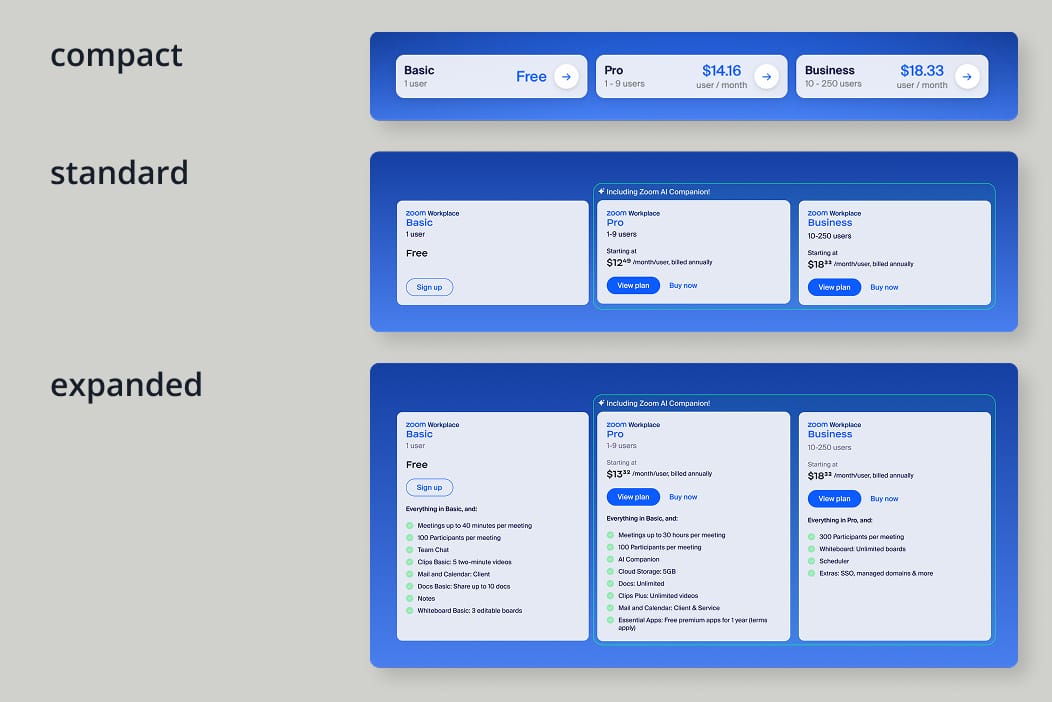
How much information should the cards show? We tested three densities: compact (plan name, price, one CTA), standard (name, price range, and basic CTAs), and expanded (full per-plan feature lists). The compact variant didn't give users enough to act on. The expanded variant created comparison paralysis. Standard hit the balance.
-
Series 03
Product fit
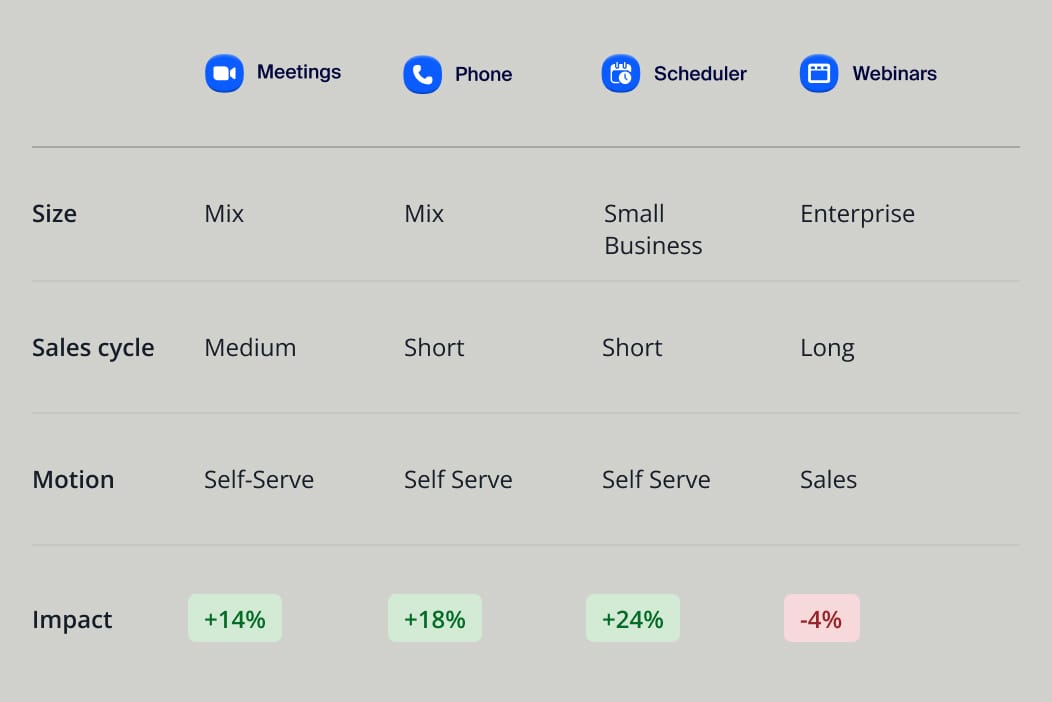
Not every product responded the same way. We tested pricing cards across Zoom Meetings, Phone, and Webinars, three products with meaningfully different audiences and buying patterns. Some of the results surprised us: where we expected a lift, a few products showed a measurable negative impact instead.
What we learned
The test series answered three questions cleanly: mid-page placement outperformed top and bottom, self-serve products responded well to on-page pricing, and medium-density cards outperformed both extremes.
The product sensitivity finding was the most instructive. Products with longer, more considered purchase motions, where buyers were still evaluating fit before thinking about price, saw conversion drop when pricing was introduced too early. On-page pricing wasn't universally helpful. It depended on who was buying and how.
From product pricing to platform pricing
Those learnings came at a moment when Zoom was evolving from a single product into a multi-product platform. Pricing a platform is a different problem than pricing a product: the audience is more fragmented, the purchase decision is more complex, and a one-size-fits-all approach serves nobody well.
The individual product tests gave us a framework to work from. We knew which signals mattered: product type, company size, purchase motion. The next step was building a pricing section that could respond to all of them dynamically.
The configurable pricing section
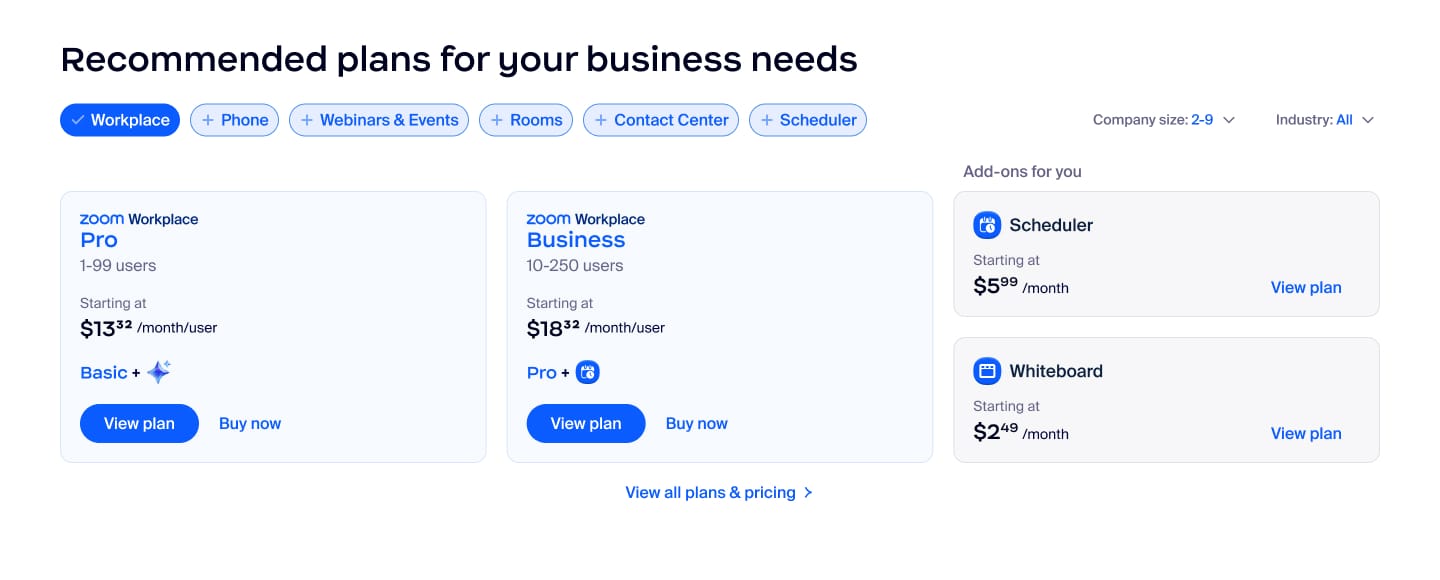
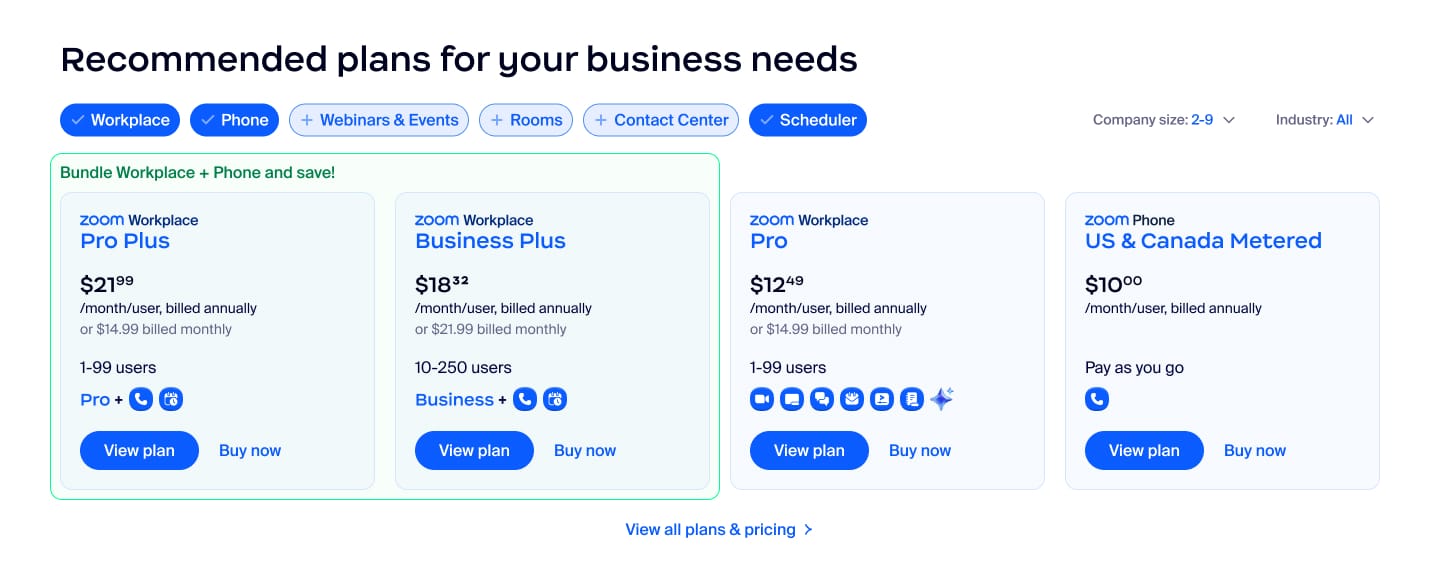
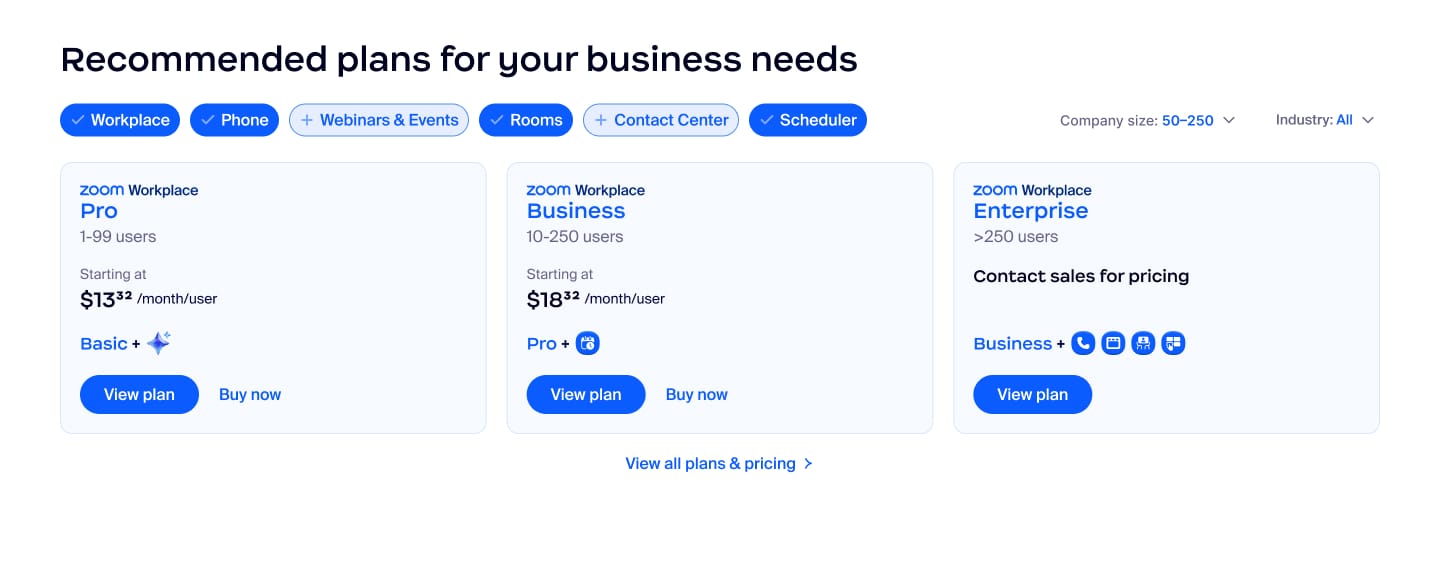
I designed a self-contained pricing section for platform-level pages that let users configure their own view: select the products they care about, set company size and industry, and see tailored bundles and add-ons matched to their context. The earlier tests had told us what variables mattered. This was the system that put them to work.
Experiment 03
Adding friction on purpose
Context
The sales team had a problem: too much volume, not enough quality. Support requests, billing questions, small businesses that should have been signing up online: all of it was landing in the same queue, and it was eating the team's capacity. We were brought in to reduce that volume and improve lead quality.
The tension
The instinct in conversion optimization is always to reduce friction. Fewer fields, simpler flow, lower barrier to submit. This project required the opposite: deliberately introducing friction to improve the quality of what came through on the other side.
The challenge was designing that friction in a way that felt helpful rather than punishing. We couldn't lose genuine leads, and we couldn't create a negative experience for users who actually needed support. Users should feel guided toward a better answer, not rejected at the door.
What we built
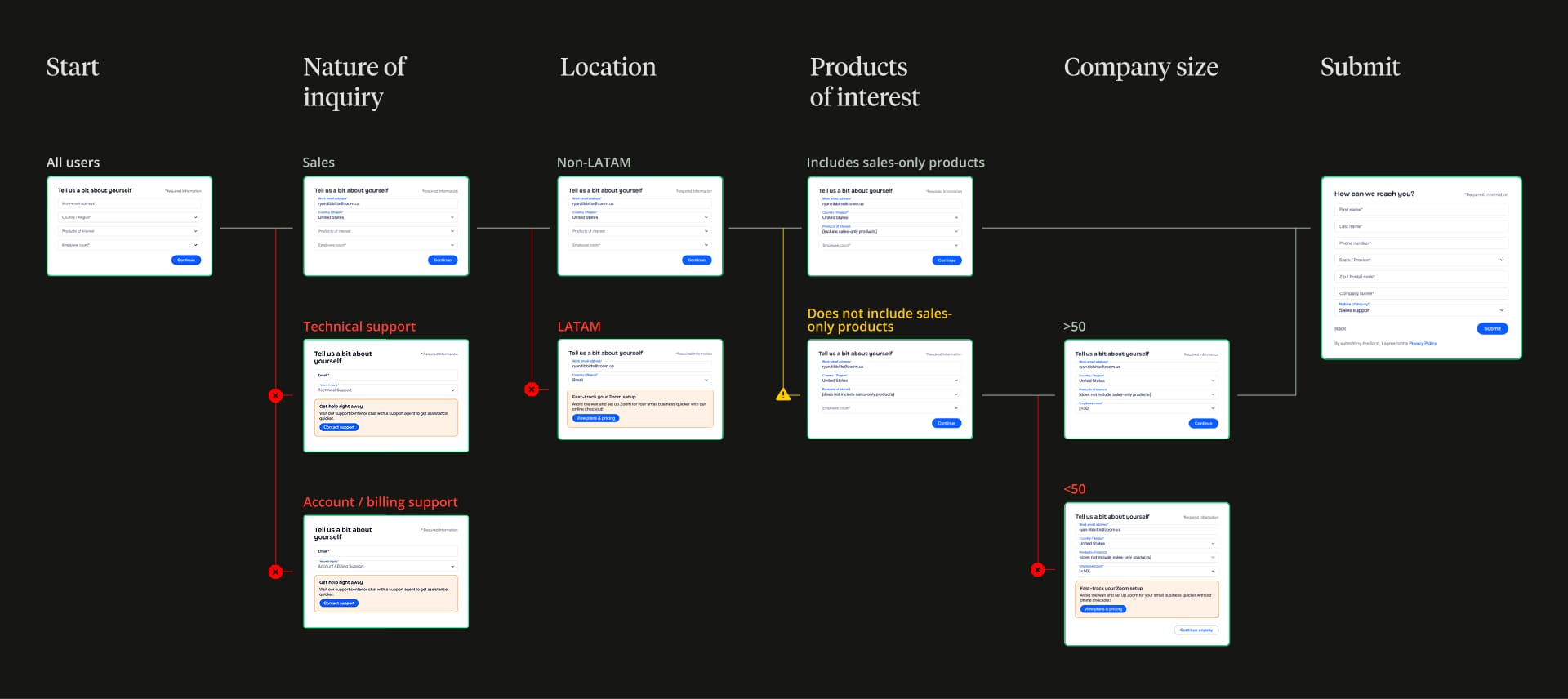
I redesigned the form as a multi-step flow, collecting the same information a contact form always would, just one step at a time. The difference was what happened with those answers: rather than routing everything to sales, the form applied logic to each submission and sent users to the right destination based on what they'd told us.
Outcome
After launch, 25% of form submissions routed to support and 18% to self-serve checkout, redirecting 43% of previous sales volume to more appropriate destinations. Overall form completions, counting all three destinations, remained effectively flat.
That flat number is the one that matters most. It meant users weren't abandoning the funnel; they were finding better-fit paths. The friction wasn't punishing them. It was sorting them.
Sales leads dropped in volume while their quality improved.